Best Focus Apps for Mac to Stay Focused (2026)

To stay focused on a Mac, use one blocker that sits between you and your usual distractions and is hard to switch off. SelfControl is the free, simple option. If you also need apps blocked, Cold Turkey Pro, Freedom, Focus or a browser with blocking built in will do it. Timers, focus music and time trackers help, but they work best once the blocking is in place.
Every price below was checked in October 2026 on the vendor’s own pricing page. Prices change, so follow the links before you buy.
What your Mac already does for free
macOS has two built-in features worth trying before you pay for anything. One of them limits things. The other only keeps things quiet.
Screen Time
Open System Settings › Screen Time. Schedule (formerly Downtime) restricts your Mac during set hours. Time Allowances (formerly App Limits) caps how long you can use an app or category each day. Content & Privacy Restrictions covers websites. Apple documents all of these in its schedules and time allowances guide and its content restrictions guide.
Turn on Lock Screen Time Settings. According to Apple, this requires a passcode to change settings and to allow more time when a limit runs out. Without it, extending a limit is one click.
There are two catches if you’re setting limits for yourself. First, you chose the passcode, so it slows you down but can’t stop you. Second, Macworld and MacMost report that Screen Time’s website limits apply in Safari only. If you work in Chrome, all you can do is put a time allowance on the whole Chrome app.
Focus modes
Focus modes silence notifications and sync across your Apple devices. They don’t block anything. If you switch to Slack or type a URL out of habit, it opens. They’re worth turning on next to a blocker, but they can’t replace one.
For a step-by-step comparison of the built-in options and third-party ones, see how to block websites on Mac.
How Mac blockers work, and why it matters
Where a blocker does its blocking decides how you get around it on a bad afternoon. That matters more than the feature list.
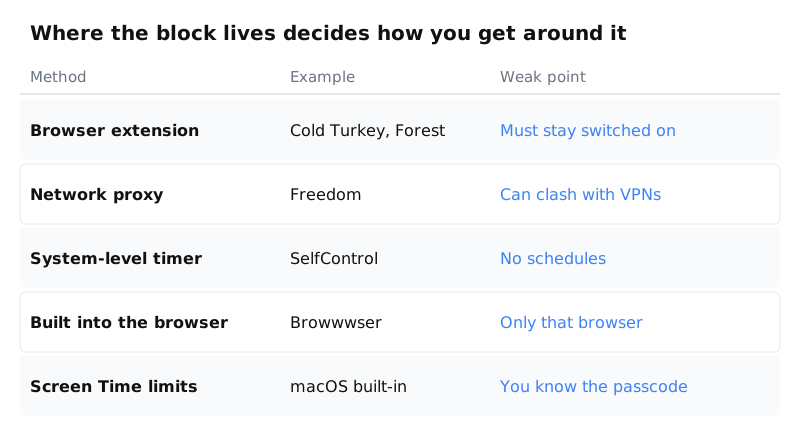
- Browser extension. The block lives inside each browser. Cold Turkey and Forest use extensions on the desktop. Turning off an extension is the obvious way around this kind of block, so good blockers watch for it.
- Network proxy. Freedom routes your traffic through a local proxy by default. Freedom’s own documentation says this can conflict with VPNs and other proxies, and offers a non-proxy mode as an alternative.
- System-level timer. SelfControl blocks sites for the whole Mac until a timer runs out. It’s strong, but you can’t schedule it.
- Built into the browser. The browser does the blocking itself, so there’s no extension to disable. It only covers that one browser, though.
- Screen Time. Built in and free, but the person it’s meant to stop also knows the passcode.
The blockers worth considering
| Tool | Blocks apps? | Free option | Price (Oct 2026) |
|---|---|---|---|
| SelfControl | No | Free, open source | Free |
| Cold Turkey | Pro only | Free plan | Pro: one-time payment |
| Freedom | Yes | Free plan | $3.33/mo yearly, $8.99 monthly |
| Focus | Yes | 7-day trial | $49, or $129 lifetime |
| Browwwser | Yes | 7-day trial | $99/yr or $199 once |
SelfControl: free and hard to undo
SelfControl is free and open source. You add sites to a blocklist, set a duration and press start. According to its site, the block holds even if you restart the Mac or delete the app. The current version is 4.0.2, and it runs on Mac OS X 10.10 or later.
It blocks internet access, not apps. You start each block by hand, with no schedules or presets. If those gaps matter to you, see SelfControl alternatives for Mac.
Cold Turkey: strict, with a one-time price
Cold Turkey’s free plan covers website blocking, exceptions, timed blocks and stats, and comes with a 7-day Pro trial. Pro adds app blocking, schedules, passwords, all the locking options, and breaks or allowances. It’s a one-time payment, and one key covers both Mac and Windows. The pricing page doesn’t list a figure, so check it at checkout.
Browser blocking works through an extension that you install in each browser. Its user guide explains that during a locked block the extension has to stay enabled. If you turn it off, Cold Turkey blocks the browser after a grace period (60 seconds by default). Frozen Turkey goes further and can lock, log off or shut down your Mac. If you’re comparing it with other options, see Cold Turkey alternatives.
Freedom: if your phone is part of the problem
Freedom runs on Mac, Windows, iOS, Android and Chromebook, so a single session can cover your laptop and your phone. The free plan includes website, app and whole-internet blocking, custom blocklists and focus music. Scheduling and Locked Mode, which stops you from quitting a session, are Premium only.
Premium costs $3.33 a month billed yearly (about $40 a year) or $8.99 month to month. The Forever plan is $199. In October 2026 it was listed on sale at $99.50, with no end date given. On a Mac, the browser extension works with the desktop app and doesn’t block anything on its own. Non-proxy mode hides Firefox.
Focus: a menu bar blocker for Mac
Focus by Meaningful Things blocks websites and apps from the menu bar. It has daily, weekly and weekend schedules, timers and breaks, profiles, and scripting. Its Locked Mode stops you from ending a session and can also require a password.
There’s a 7-day free trial and a 30-day money-back guarantee. It costs $49, or $129 for lifetime access. According to the changelog, the latest release is 2.4.1, from August 2025.
Browwwser: blocking that is part of the browser
Browwwser is the browser this site makes, so weigh this section with that in mind. It’s a Chromium-based browser for macOS 12 or later, with site and app blocking built in. A blocked site doesn’t load: Browwwser shows a plain “site is blocked” page, with no countdown, no “continue anyway” button and no extension to disable. It also closes the macOS apps you add to the list, such as Discord or Steam, while blocking is on.
Lock mode freezes your blocklist behind a recovery password you choose. There’s no unlock button and no timer. Scheduled blocking covers recurring windows like work hours, and presets block social media, news, video or shopping in one click. Importing from Chrome brings over your bookmarks, passwords, history and extensions, and Chrome extensions keep working.
The limits: it’s macOS only, and it’s paid after the 7-day trial ($99 a year or $199 once, with a 14-day money-back guarantee; see pricing). Website blocking also only applies inside Browwwser, so it has to become your everyday browser. Its Other Browsers preset can close Safari or Chrome while blocking is on. If you’re on Windows or need your phone covered too, Freedom fits better. For more options across platforms, see the website blockers comparison. To compare ways of blocking inside the browser, see browsers with a built-in website blocker.
Timers: for when the problem is getting started
If distraction isn’t what stops you and starting is, a timer helps more than a blocker. Committing to a single 25-minute block is easier than facing the whole task.
- Flow is a native Mac Pomodoro timer. The timer is free. The low-cost Pro subscription adds app and website blocking, so Flow can cover both jobs if your needs are light.
- Forest grows a virtual tree while you focus and kills it if you leave. There’s no Mac app: on a Mac it’s a Chrome or Firefox extension, which you can turn off like any other. Forest no longer sells its one-time Pro upgrade. It now has a free tier and a Plus subscription whose price varies by region and platform.
- TickTick combines a task list with a focus timer. Premium is US$49.99 a year.
Focus music: what the Brain.fm evidence shows
Brain.fm makes music for focus, relaxation and sleep, with a Mac app for macOS 12 or later and a Windows app. It costs $99.99 a year or $14.99 a month after a trial.
The main evidence is a 2024 lab study in Communications Biology. According to Northeastern University, it had about 40 participants, was run together with Brain.fm, and found the largest effect in people with attention difficulties. That’s a real result, but it’s small and company-linked, and it doesn’t show that Brain.fm helps you get more work done.
If you just want background sound without lyrics, free playlists do the job.
Time tracking: find out what to block first
RescueTime runs in the background and reports which apps and sites you spend time on. Its Focus Sessions add a timer and distraction blocking, and Goals & Alerts warn you when you go over a limit.
Solo costs $7 a month billed yearly ($84) or $9 month to month. Solo+, which adds timesheets, is $12 a month yearly or $15 monthly. There’s a 14-day trial and a free Lite plan. A week of tracking shows you which sites belong on your blocklist.
Why a to-do app won’t keep you off Reddit
Task managers such as Things, a one-time purchase for Mac, iPhone, iPad, Apple Watch and Vision Pro, or TickTick tell you what to do next. They can’t stop you opening a tab instead. If your list is fine but your afternoons disappear, a better list won’t help. What helps is a blocker running while you work through it.
Which setup fits your problem
Start from what goes wrong, then pick the matching type of tool.
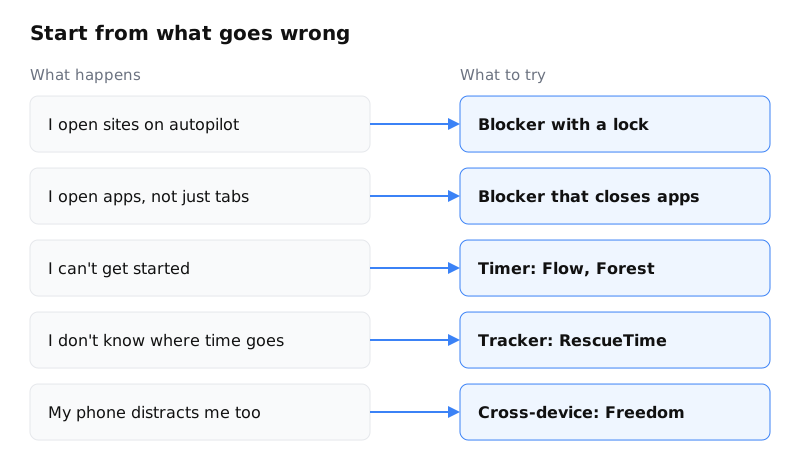
Free setup. Turn on Focus modes for notifications. Use SelfControl for website blocks during work sessions, Flow’s free timer for structure, and a lo-fi playlist for sound. The gap is apps: nothing stops you from opening Discord.
Paid setup. Pick one blocker that closes apps and can lock (Cold Turkey Pro, Freedom Premium, Focus or Browwwser). Add RescueTime if you want data on whether it’s working. Don’t run two blockers at once, because routing-based tools can conflict, and two blocklists are twice the setup to maintain.
If attention difficulties are part of the picture, these tools can help with the friction, but they aren’t treatment. ADHD-specific apps cover routines and reminders that blockers don’t.
Frequently asked questions
What is the best free focus app for Mac?
For hard website blocking, SelfControl is free and open source, and its blocks last through a restart and even deleting the app. Freedom's free plan also blocks websites and desktop apps, but scheduling and Locked Mode require Premium.
Can I just use Screen Time to stay focused on my Mac?
You can, if you turn on Lock Screen Time Settings so that extending a limit needs a passcode. The weak points are that you know your own passcode, and that Screen Time's website limits are reported to work in Safari only, not Chrome.
Do macOS Focus modes block apps or websites?
No. Focus modes silence notifications and sync across your Apple devices, but nothing stops you from opening an app or a website. Use them alongside a blocker, not as a replacement for one.
Which Mac focus apps block both websites and apps?
Cold Turkey Pro, Freedom, Focus (by Meaningful Things), Flow Pro and Browwwser all block both. SelfControl blocks internet access only, and macOS Screen Time sets time allowances on apps instead of blocking them outright.
Can I run two website blockers at the same time?
It's better not to. Blockers that route traffic, such as Freedom's default proxy, can conflict with VPNs and other proxies, and two overlapping blocklists are harder to keep track of. Pick one blocker and pair it with a timer or tracker instead.
A Mac browser that blocks distractions,
built for deep work.
A macOS browser that blocks distracting sites in its engine and closes distracting apps.
Try it free for 7 daysIf you keep switching your blocker off, try a browser where blocking is part of the browser. It runs on macOS 12 or later and has a 7-day free trial.
Try it free for 7 days