The best SelfControl alternative
Which website blocker is right for you?
Quick Comparison
| Feature |  Browwwser Browwwser |  SelfControl SelfControl |
|---|---|---|
| Platform | macOS | macOS |
| Price | $99/yr or $199 lifetime | Free |
| Free tier | 7-day free trial | Fully free |
| Bypass difficulty | Very hard | Hard |
| Blocking method | Browser engine — requests killed at the network layer, no extension to disable | System firewall rules |
If you are leaving SelfControl because it has no schedule or can’t close apps, look at Cold Turkey Pro, Freedom Premium or Browwwser. If all you want is blocks longer than 24 hours, you don’t need to switch. The right replacement depends on which limit you hit, so this page takes them one at a time.
SelfControl is still a good tool. It is free and open source (GPL, on GitHub), and it needs no account. According to its own site, a block holds even if you restart your Mac or delete the app. Its weaknesses are the things it doesn’t do, and how long it has gone without a release.
Is SelfControl still maintained?
Only barely. The current version is 4.0.2, and the commit that set that version number is dated 27 October 2021. One later change, Touch ID support for the password prompt, was committed on 29 November 2025. It has not shipped in a release.
The more pressing problem is macOS Tahoe 26. Issue #911 reports that on a Tahoe beta, 4.0.2 freezes when you start the timer and no block is applied. As of 30 September 2026 the issue is still open, with no fix or workaround posted. In the same thread, a user reported in November 2025 that SelfControl works on macOS 26.1, so the bug may be limited to the beta. Start a short test block after any macOS update before you rely on it.
Older Macs are a different case. SelfControl 4.0.2 runs on macOS 10.10 or later, while Browwwser needs macOS 12. On an older machine, SelfControl may be the only one of the two that installs.
Two complaints you can fix without switching
Blocks longer than 24 hours
24 hours is the default limit, not a hard cap. From version 4.0 you can raise it in Terminal:
defaults write org.eyebeam.SelfControl MaxBlockLength -int 43200
The number is in minutes. 43200 minutes (one month) is the example SelfControl’s wiki gives. The wiki warns that a mistake in the command can stop the app from launching, so copy it exactly. Also remember that nothing shortens a month-long block once it starts.
Blocking everything except a few sites
SelfControl has an allowlist mode, called “whitelist” before version 3.0.2. It blocks everything except the entries you list, which suits an exam session where you need one course site and nothing else. What you can’t do is shorten or loosen a block once it’s running. Asked how to stop a block early, the FAQ answers: “You can’t. That’s the idea. Just wait.”
Where SelfControl’s blocking has gaps
SelfControl combines the macOS packet filter firewall with entries in /etc/hosts (source code). It blocks the server a site is hosted on, not the page address. That makes the block system-wide, but its own FAQ and troubleshooting page list these gaps:
- VPNs and proxies: blocks don’t work properly, and corporate VPNs such as Pulse Secure have to be disconnected.
- Firefox: DNS over HTTPS can make blocks unreliable unless you restart Firefox after starting each block.
- Subdomains: some sites load from extra domains, which you have to find and add yourself.
- No page-level rules: you can’t block one subreddit and allow another. It’s the whole host or nothing.
If you work behind a company VPN, the first gap alone is a reason to try a blocker that works inside the browser. Test any replacement with the VPN connected during its trial.
Which alternative fits your reason for leaving?
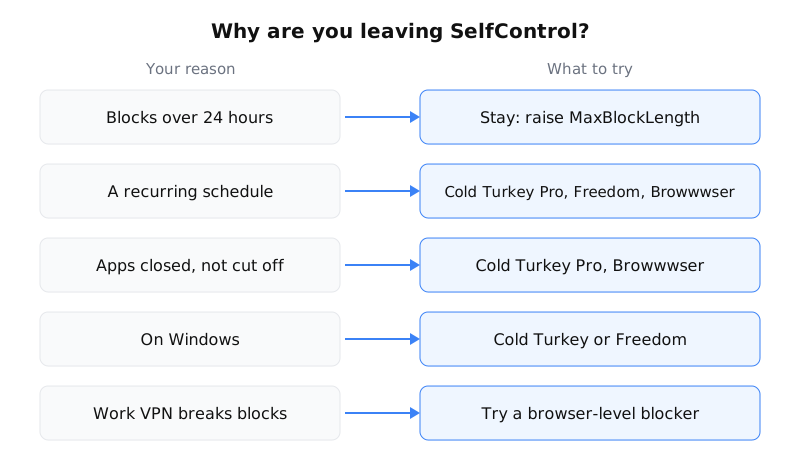
- You want a schedule. SelfControl has no recurring blocks, and a request for them (issue #874) has been open since May 2024. Blocks you have to start by hand tend to get skipped on the days you need them most. Cold Turkey Pro, Freedom Premium and Browwwser all run on a schedule.
- You want apps closed, not just cut off. Cold Turkey Pro and Browwwser both close blocked apps.
- You’re on Windows, or also need your phone covered. Cold Turkey runs on Windows and macOS, and one purchase covers all your personal computers (pricing page). Freedom runs on Mac, Windows, iOS, Android and ChromeOS. See our Cold Turkey comparison.
- It has to stay free. Cold Turkey and Freedom both have free tiers, but scheduling is a paid feature in both. If free is the priority, SelfControl is still the strongest option on a Mac.
On price (checked 30 September 2026): Freedom Premium is $3.33 a month billed yearly, $8.99 month to month, or $99.50 for lifetime access. Cold Turkey Pro is a one-time payment with a 7-day trial and a 30-day refund. Its price is on Cold Turkey’s pricing page. Browwwser is $99 a year or $199 lifetime, with a 7-day trial and a 14-day money-back guarantee. The Freedom comparison and our full list of website blockers go further.
How Browwwser differs from SelfControl
The two tools block at different layers, and that decides most of the trade-offs.
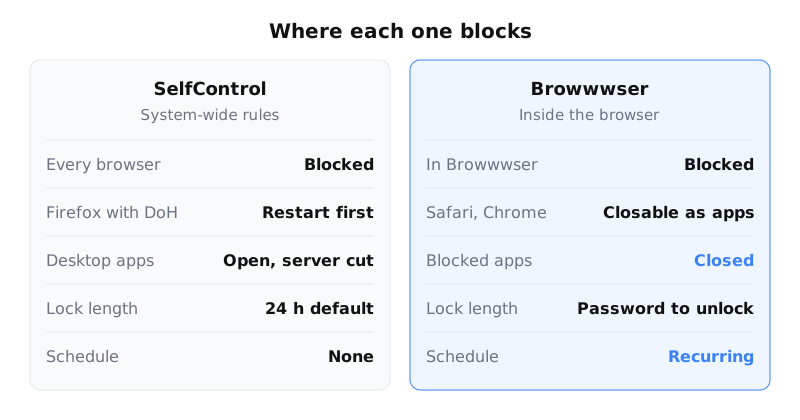
SelfControl changes system network rules, so every browser on the Mac is affected. Browwwser is a Chromium-based browser with the blocking built in. A blocked site doesn’t load: Browwwser shows a plain “site is blocked” page, with no countdown and no “continue anyway” button. There is also no extension to switch off. It closes the macOS apps you add to the list, such as Discord or Steam, while blocking is active.
Lock mode freezes the blocklist behind a recovery password you choose. There’s no unlock button and no timer. Recurring schedules cover things like work hours, and presets block social media, news, video or shopping in one click. Chrome bookmarks, passwords, history and extensions import in one click, and Chrome extensions keep working.
The limits are real. Browwwser is macOS only, needs macOS 12 or later, and is paid after the trial. Its website blocking only applies inside Browwwser, so if Safari is open, your blocked sites load there. The Other Browsers preset can close Safari, Chrome and others while blocking is on, but SelfControl is stronger on that point. For the other approaches, see how to block websites on Mac.
Can you use both?
Yes, and unlike most pairs of blockers, the two fill each other’s gaps. Browwwser can be your everyday browser, with a schedule for work hours and app blocking for Discord. Before a hard deadline, you can add a SelfControl block so that Safari and every other browser are covered too. If you’re on Tahoe, check first that SelfControl starts at all.
When to stay with SelfControl
Stay if you need it free, only block websites, don’t use a VPN, and are happy to start each session yourself. That’s even more true if the longer-block setting or allowlist mode solves your actual complaint. On a Mac older than macOS 12, it may be your best option. Just test a short block after every macOS update, since no new release is coming to fix things.
Frequently asked questions
Is SelfControl still being updated?
Not in releases. The current version, 4.0.2, dates from October 2021. A Touch ID change was committed to the GitHub repository in November 2025 but has not shipped in a release.
Does SelfControl work on macOS Tahoe 26?
Probably, but test it first. An open GitHub issue (#911) reports that 4.0.2 froze on a Tahoe beta when you started the timer, and no fix has been posted. A user later reported it working on macOS 26.1, so start a short test block before you rely on it.
Can SelfControl block for longer than 24 hours?
Yes. 24 hours is only the default limit. From version 4.0 you can raise it with the Terminal command defaults write org.eyebeam.SelfControl MaxBlockLength -int followed by the limit in minutes, as described on SelfControl's wiki.
Does SelfControl block desktop apps like Discord or TikTok?
No. It can stop an app from reaching a blocked server, but the app still opens and runs. To have apps closed, you need a tool with app blocking, such as Cold Turkey Pro or Browwwser.
Can I use SelfControl and Browwwser together?
Yes, and it can make sense. Browwwser handles scheduled blocking and app blocking inside your daily browser. SelfControl adds a system-wide block that also covers Safari, Chrome and other browsers during a hard deadline.
The Bottom Line
SelfControl is a solid choice if you need completely free and open-source. But if your main problem is bypassing your own blocker when willpower runs out, Browwwser solves that at the architecture level — the blocking runs inside the browser engine, not on top of it.
Blocking that lives in a browser extension can be switched off in two clicks. Browwwser blocks from inside the browser engine.
Try it free for 7 days