The best StayFocusd alternative
Which website blocker is right for you?
Quick Comparison
| Feature |  Browwwser Browwwser |  StayFocusd StayFocusd |
|---|---|---|
| Platform | macOS | Chrome |
| Price | $99/yr or $199 lifetime | Free |
| Free tier | 7-day free trial | Fully free |
| Bypass difficulty | Very hard | Low |
| Blocking method | Browser engine — requests killed at the network layer, no extension to disable | Chrome extension |
If StayFocusd keeps losing to you, choose a replacement based on how you get past it. LeechBlock is a free extension that also runs in Firefox. SelfControl gives you a free block on a Mac that survives a restart. Freedom or Cold Turkey cover Windows, and Freedom also covers your phone. Browwwser is for Mac users who want daily blocking that isn’t an extension they can switch off.
StayFocusd is still free and still widely used. In October 2026 its Chrome Web Store publisher page listed about 700,000 users and a 4.4 rating, with Sensor Tower as the publisher. Its features are rarely the problem. The problem is where it lives: the same browser menu you use to turn it off.
What StayFocusd does well, and what older reviews get wrong
StayFocusd is more capable than many write-ups say. The Chrome Web Store listing showed version 4.6.14, updated September 10, 2026. Here is what it does:
- Daily allowance for a list of sites. You list sites and set a total time. Once you’ve used it, those sites stay blocked for the rest of the day. In the classic version, one allowance covers the whole list. It is not set per site.
- Active days and hours. You can restrict blocking to workdays or work hours, so weekends can stay open (ghacks, Gigazine).
- Require Challenge. This is a built-in setting, not a separate extension. Before you can change any settings, you have to retype a long passage, and pasting doesn’t work.
- Nuclear Option. This blocks your list, or everything, for a set number of hours. You can’t cancel it from inside the extension.
- Finer blocking. You can block subdomains, paths, single pages and in-page content such as videos and forms. It can also hide YouTube Shorts, comments and recommendations, and it adds a focus timer and usage analytics.
It runs in Chrome, and it also has a Microsoft Edge Add-ons listing. There is no Firefox, Safari, iPhone or Android version. “Stay Focused: App/Site Blocker” from INNOXAPPS is a separate, paid mobile app and has nothing to do with StayFocusd.
How people get around StayFocusd
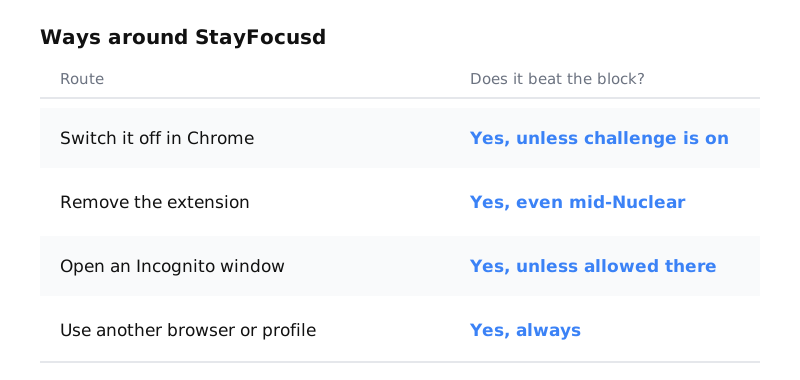
Every route works for the same reason: StayFocusd is an extension, and Chrome lets you manage your own extensions.
- Switch it off at chrome://extensions. No password is needed unless Require Challenge is on.
- Remove it. The challenge protects the settings, not the remove button. Removing the extension also ends a Nuclear Option block that is still running.
- Open an Incognito window. Extensions only run in Incognito if “Allow in Incognito” is turned on in the extension’s details (Google’s help page).
- Use another browser or Chrome profile. StayFocusd only exists in the profile where you installed it.
If you keep slipping through one of these routes, a stricter StayFocusd setting won’t fix it. The block has to live somewhere else. For other options that stay inside Chrome, see how to block websites on Chrome.
Pick a replacement by your reason for leaving
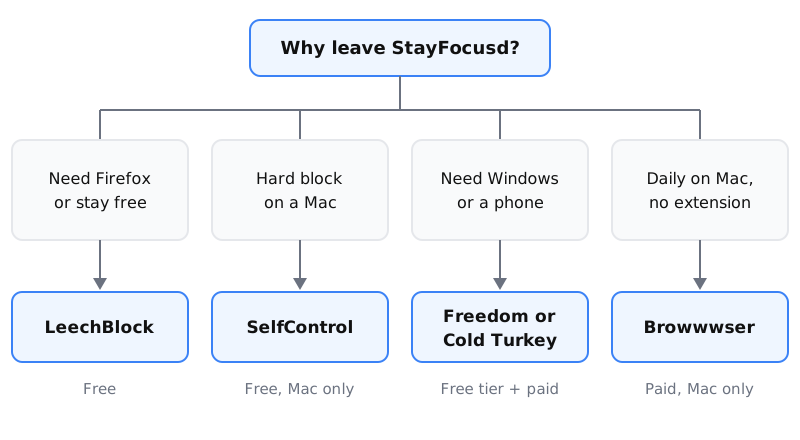
Each tool below fixes a different gap. Start with the reason you are leaving and skip the rest.
LeechBlock: the free swap that also runs in Firefox
LeechBlock is free and runs on Firefox, Chrome, Edge and other Chromium browsers. You get up to 30 block sets, and each one can have its own schedule and time limit (for example, 10 minutes per hour). It also has a Lockdown mode and can put a password or access code on its settings page.
LeechBlock is still an extension, so all four routes above work against it too. Choose it if you like how StayFocusd works but want Firefox support or more detailed rules. See the LeechBlock comparison.
SelfControl: a free block on Mac that doesn’t let go
SelfControl is free, open source and runs only on macOS. Once a block starts, it stays until the timer runs out, even if you restart the Mac or delete the app. The Nuclear Option is trying to do the same thing, but SelfControl blocks outside the browser.
The trade-off is that SelfControl has no daily allowance and no schedule. You start every block by hand. It works best for an exam day or a deadline. See the SelfControl comparison.
Freedom or Cold Turkey: for Windows and phones
Freedom runs on Mac, Windows, iOS, Android and Chromebook from one account. As of October 9, 2026, its pricing page lists Premium at $8.99 per month, or $3.33 per month on a yearly plan. It also has a free tier and a 7-day trial. More in the Freedom comparison.
Cold Turkey runs on Windows and macOS but has no phone app. The free version blocks websites with timed blocks and shows statistics. Pro is a one-time purchase (the price isn’t shown on its pricing page) and adds app blocking, schedules, locks and allowances. See the Cold Turkey comparison.
Browwwser: Mac blocking without an extension
Browwwser is a Chromium-based browser for macOS 12 or later, with blocking built into the browser itself. A blocked site doesn’t load, and there is no extension to switch off or remove. Lock mode freezes your blocklist behind a recovery password you choose, with no unlock button and no timer. Scheduled blocking covers work-hours use, like StayFocusd’s active hours. It also closes the Mac apps you add to the list, such as Discord.
Browwwser has real limits. It only runs on Mac, and it only blocks inside Browwwser, so Safari or Chrome can still open blocked sites unless you close them with the Other Browsers preset. Chrome import moves your bookmarks, passwords, history and extensions over in one click. It costs $99 a year or $199 once, after a 7-day trial, with a 14-day money-back guarantee (pricing). If a free nudge is enough for you, StayFocusd or LeechBlock costs nothing.
When it makes sense to keep StayFocusd
If your distraction is mild and you only use one browser, you can make StayFocusd stricter without replacing it. Turn on Require Challenge, allow it in Incognito, and set active hours. If YouTube is your main problem, turn on its Shorts and recommendation hiding.
Before you install it, note that it asks for permission to read and change data on all sites. Check the privacy practices section of its Chrome Web Store listing. Its publisher, Sensor Tower, is an app-analytics company.
Frequently asked questions
Is StayFocusd still free?
Yes. The Chrome Web Store lists StayFocusd at $0, and it has no paid tier. It is published by Sensor Tower.
Does StayFocusd have scheduling?
Yes. Its Active Days and Active Hours settings let you limit blocking to certain days and times, such as weekdays from 9 to 5. Some older reviews say it has no scheduling, but that is wrong.
Can you get around StayFocusd's Nuclear Option?
You can't cancel it from inside the extension. You can still get around it by removing the extension, or by using another browser or Chrome profile, because the block only exists where the extension is installed.
What is the best free StayFocusd alternative for Firefox?
LeechBlock. It is free, runs on Firefox, Chrome and Edge, and offers up to 30 block sets with their own schedules, time limits and an optional password on its settings.
Does StayFocusd work on iPhone or Android?
No. StayFocusd is a browser extension for Chrome and Edge only. "Stay Focused: App/Site Blocker" on the App Store is a separate, paid app from a different developer, INNOXAPPS.
The Bottom Line
StayFocusd is a solid choice if you need free with no limitations. But if your main problem is bypassing your own blocker when willpower runs out, Browwwser solves that at the architecture level — the blocking runs inside the browser engine, not on top of it.
Blocking that lives in a browser extension can be switched off in two clicks. Browwwser blocks from inside the browser engine.
Try it free for 7 days