The best Cold Turkey alternative
Which website blocker is right for you?
Quick Comparison
| Feature |  Browwwser Browwwser |  Cold Turkey Cold Turkey |
|---|---|---|
| Platform | macOS | Windows, macOS |
| Price | $99/yr or $199 lifetime | One-time purchase (Pro) |
| Free tier | 7-day free trial | Yes (basic blocking) |
| Bypass difficulty | Very hard | Medium |
| Blocking method | Browser engine — requests killed at the network layer, no extension to disable | System-level app + browser extension |
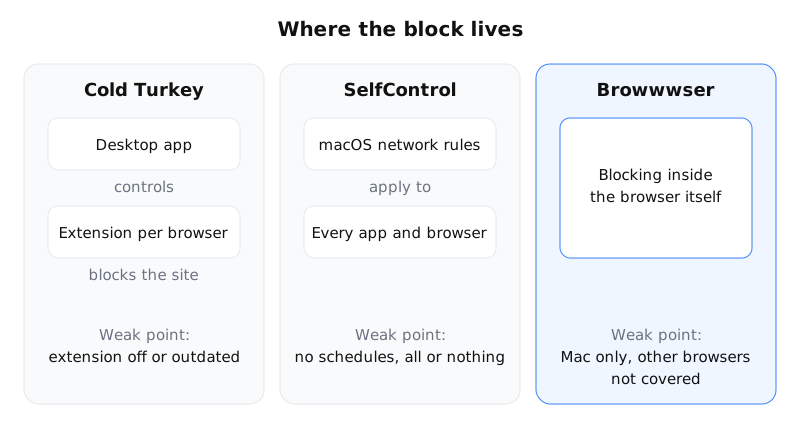
Most people who look for a Cold Turkey alternative on a Mac are not unhappy with the idea behind it. They are tired of the browser extension it depends on: when the extension is missing, disabled or broken after a browser update, the block has a hole in it. If that is your reason, the alternatives worth looking at are the ones that do not rely on an extension at all: SelfControl, which is free and blocks at the system level, and Browwwser, a Mac browser with the blocking built in.
This page explains how Cold Turkey blocks, where it leaks, what it still does better than anything else, and which alternative fits which situation.
How Cold Turkey blocks websites
Cold Turkey Blocker is a desktop app for Windows and macOS. The app decides what is blocked and when; the actual website blocking happens in the browser, through Cold Turkey’s extension. The user guide is explicit that the extensions must be “installed and enabled” for blocking to work.
To close the obvious loophole, the app watches for browsers it cannot control. During a locked block it “tries its best to detect and block unsupported browsers”, and it can close a supported browser whose extension has been disabled or has crashed. Locks come in three kinds: typing a long random string, restarting the computer, or allowing changes only at certain times of day.
Where it leaks on a Mac
The design works well when everything is up to date. The problems people run into are at the edges:
- Browser updates. A browser update can leave the extension disabled or out of sync with the app. Until you notice and fix it, that browser may not be blocked, or Cold Turkey may keep closing it.
- Private windows. Extensions do not run in private windows unless you allow them, and the user guide itself suggests disabling incognito mode manually in some setups.
- Many browsers, many extensions. Every browser you use needs its own extension. Add a new one (a beta build, a second Chromium browser) and the block depends on Cold Turkey recognising it.
- Free version limits. On the free version you get website blocking and timers. Locks, schedules and app blocking are Pro features.
None of this makes Cold Turkey a bad tool. It means the strength of the block depends on the extension being present and healthy in every browser on the machine.
What Cold Turkey still does better
Be fair to it before switching. Cold Turkey is a one-time purchase, and one licence covers all the computers you personally use, on Windows and macOS. Frozen Turkey can lock you out of the whole computer, or log you off, for a set time; nothing on this page does that. It also blocks desktop apps and games on Pro, and it has been maintained for years.
If you work on Windows, or on both Windows and a Mac, Cold Turkey remains one of the strongest options available, and the alternatives below are mostly Mac-only.
Cold Turkey alternatives by situation
| If you want… | Look at | Why |
|---|---|---|
| A block that cannot be undone, for free | SelfControl | Open source, Mac only. Blocks at the system level for a set time; even a restart does not end it. No schedules, no allowlist per app. |
| Blocking without any extension, plus schedules | Browwwser | A Mac browser with the blocking inside it: nothing to disable, lock mode, schedules, app blocking. Paid after a 7-day trial. |
| The same limits on your phone too | Freedom | Mac, Windows, iPhone and Android, with sessions synced across devices. Subscription. |
| Something simple inside Firefox or Chrome | LeechBlock | Free, flexible rules, but it is an extension: easy to switch off. |
When Browwwser is the better fit
Browwwser replaces your browser instead of watching it. It is built on Chromium, so your Chrome extensions, bookmarks and passwords come with you in one import, and the blocking is part of the browser rather than an add-on. A blocked site does not load, and there is no extension page where it can be turned off. Lock mode freezes the blocklist behind a recovery password you choose: there is no unlock button and no timer.
It fits if you work on a Mac, spend most of your distracted time in a browser, and have already found yourself disabling an extension “just this once”. It also closes the Mac apps you add to the blocklist, such as Discord or Steam, and its Other Browsers preset can close Safari, Chrome or Firefox.
It does not fit if you need Windows, if you want a free tool, or if you are not willing to use it as your main browser: blocking of websites only applies inside Browwwser. In those cases, stay with Cold Turkey or use SelfControl. Pricing is on the home page.
Switching from Cold Turkey
- Export your list. Copy your Cold Turkey block list somewhere; you will paste the domains back in.
- Install Browwwser and import from Chrome. Bookmarks, passwords, history and extensions come across in one step.
- Rebuild the block. Start from a preset (social media, news, video) and add your own domains.
- Set a schedule, for example work hours on weekdays, and live with it for a few days before you turn on lock mode.
- Decide what to do with Cold Turkey. If you use other browsers for work, you can keep Cold Turkey running for them; otherwise uninstall it so the two do not fight over the same browsers.
For a broader comparison of blocking methods, see the best website blockers and how to block websites on a Mac.
Frequently asked questions
Does Cold Turkey work without a browser extension?
Not for websites. Cold Turkey's user guide says its extensions must be installed and enabled for website blocking to work; during a locked block the app also tries to detect and block browsers it does not support.
Is there a free Cold Turkey alternative for Mac?
SelfControl is free and open source. It blocks sites at the system level for a set time and the block survives a restart, but it has no schedules and cannot be paused.
Is Cold Turkey a subscription?
No. Cold Turkey Blocker has a free version, and Pro is a one-time purchase that covers all the computers you personally use, on Windows and macOS.
Can Browwwser replace Cold Turkey on Windows?
No. Browwwser is available on macOS 12 or later only. On Windows, Cold Turkey remains one of the strongest blockers available.
The Bottom Line
Cold Turkey is a solid choice if you need app blocking (Frozen Turkey locks entire computer). But if your main problem is bypassing your own blocker when willpower runs out, Browwwser solves that at the architecture level — the blocking runs inside the browser engine, not on top of it.
Blocking that lives in a browser extension can be switched off in two clicks. Browwwser blocks from inside the browser engine.
Try it free for 7 days