The best Freedom alternative
Which website blocker is right for you?
Quick Comparison
| Feature |  Browwwser Browwwser |  Freedom Freedom |
|---|---|---|
| Platform | macOS | macOS, Windows, iOS, Android, Chrome |
| Price | $99/yr or $199 lifetime | $3.33/mo billed yearly |
| Free tier | 7-day free trial | Unlimited 2-hour sessions |
| Bypass difficulty | Very hard | Medium |
| Blocking method | Browser engine — requests killed at the network layer, no extension to disable | Local proxy on Mac + optional browser extension |
If Freedom keeps letting you back in on your Mac, the reason is usually built into Freedom itself. Locked Mode still lets you end one session early each week, and the free plan doesn’t include Locked Mode at all. If you need blocking on an iPhone, Android phone or Windows PC, keep Freedom on those devices. On a Mac, a browser with blocking built in, such as Browwwser, takes away the switches Freedom leaves within reach. The trade-off is that its blocking only works inside that browser.
How does Freedom block websites on a Mac?
Freedom is often described as a VPN-based blocker, but that isn’t how it works on Mac or Windows. There, the desktop app runs a local proxy that filters what your browsers load. If the proxy causes problems with your setup, you can switch to an optional Non-Proxy Mode. The VPN-style “Freedom Profile” is what Freedom uses on iPhone, together with a Safari Content Blocker and Screen Time for apps (Freedom help: iOS).
The browser extension is available for Chrome, Firefox, Edge and Opera, but not Safari, and it’s optional on desktop. According to Freedom’s extension documentation, it shows the block screen and makes it appear faster, but the app does the blocking. That means disabling the extension in chrome://extensions doesn’t get you past Freedom on a Mac, whatever many comparisons say.
Freedom also blocks Mac apps. By default it hides them. If you turn on the “Kill Blocked Apps” setting, it force-quits them instead (Freedom help: blocking apps on Mac). App blocking is included in the free plan.
What does Freedom’s free plan include?
The free plan doesn’t cap how many sessions you run. It caps how long each one lasts: a free session can run for at most 2 hours and has to start right away. You can’t schedule it, you can’t make it repeat, and you can’t use Locked Mode. You do get unlimited devices, sync between them, app blocking and custom blocklists (Freedom: Free vs Premium).
This means the free plan works for a quick 2-hour sprint you start by hand. It doesn’t help when the problem is stopping a session halfway through, because nothing stops you from ending it.
Where Freedom’s Locked Mode gives way
Locked Mode is the setting that’s supposed to stop you from ending a session. These limits all come from Freedom’s own Locked Mode page and related help articles:
- You get one early exit a week. Locked Mode still lets you use End Session once every 7 days. If you only give in about once a week, Locked Mode won’t stop that one time.
- It’s Premium only, and you turn it on per device. You have to enable it on the dashboard and on each device. A device where you forgot to turn it on is easy to get around.
- On iPhone, the Screen Time permission is a gap. Locked Mode doesn’t stop you from turning off Freedom’s Screen Time permission, so Freedom recommends setting a Screen Time passcode. Also, only one VPN can run at a time, so a personal or work VPN conflicts with blocking.
- Uninstall protection is something you set up yourself. On Mac, Freedom recommends five steps: keep a session running, use Locked Mode, turn on Start at Login, block Activity Monitor, and add the uninstaller to your blocked apps (Freedom help: prevent uninstalling). If you skip one, the gap stays open.
There are also practical problems on a Mac. Proxy mode can conflict with VPNs, other proxy apps and work computers managed by your employer. Non-Proxy Mode avoids those conflicts, but you can only switch to it between sessions. It also hides Firefox, and the block screen takes 1 to 2 seconds to appear. Freedom only supports Chrome, Safari, Opera, Edge, Brave, Vivaldi, Orion and Arc, and it doesn’t cover Little Arc windows (supported browsers).
None of this makes Freedom easy to beat. Each gap needs a deliberate step, which is why “Medium” is a fair rating for bypass difficulty. Whether that’s enough depends on how determined you are at 11 p.m.
How Browwwser blocks differently
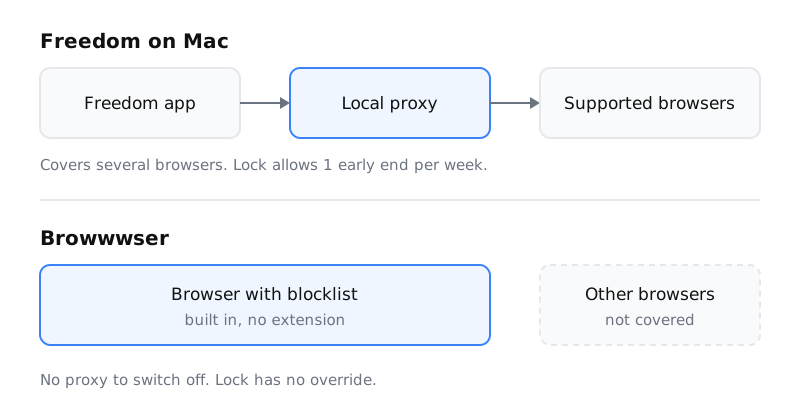
Browwwser is a Chromium-based browser for macOS, and its blocking is part of the browser, not an add-on. A blocked site doesn’t load. Browwwser shows a plain “site is blocked” page with a count of how many times it was blocked, and no countdown or “continue anyway” button. There’s also no extension to disable and no proxy to switch off.
Lock mode freezes your blocklist behind a recovery password you choose. There’s no unlock button and no timer, so you don’t get a weekly early exit. If you forget the password, support sends a one-time recovery code within 24 hours. Scheduled blocking turns your rules on during set times, such as work hours or evenings. One-click presets cover social media, news, video and shopping. While blocking is on, Browwwser also closes the macOS apps you add to the list, such as Discord or Steam.
Because Browwwser is built on Chromium, your Chrome extensions work in it. Bookmarks, passwords, history and extensions import from Chrome in one click.
What Browwwser doesn’t do
These limits matter as much as the features:
- It only runs on macOS (macOS 12 or later). There’s no iPhone, iPad, Android or Linux version. A Windows waitlist exists, but there’s no Windows app.
- Its blocking only works inside Browwwser. Freedom’s proxy covers several browsers at once. Browwwser only blocks sites you open in Browwwser, so you need to make it your browser. Its Other Browsers preset can close Safari, Chrome and the rest while blocking is on.
- It costs more and covers fewer devices. After the 7-day trial, Browwwser costs more than Freedom’s yearly plan, and it only covers your Mac. There’s a 14-day money-back guarantee.
- It doesn’t sync with your phone. If your phone is the problem, Browwwser won’t help with it.
Price compared (checked 11 October 2026)
| Freedom | Browwwser | |
|---|---|---|
| Yearly | $3.33/mo billed yearly (about $39.96) | $99/yr |
| Monthly | $8.99/mo | Not offered |
| Lifetime | Forever plan, $199 list price, shown at $99.50 with a coupon | $199 one-time |
| Before paying | Free plan (2-hour sessions); 7-day trial on yearly | 7-day free trial |
| Devices | Mac, Windows, iOS, Android, ChromeOS | macOS only |
Freedom’s prices come from freedom.to/pricing and the upgrade page. No end date is shown for the lifetime discount. The 7-day trial on Freedom’s yearly plan is described in its billing FAQ. Browwwser’s current prices are on the pricing section.
Other Mac alternatives to Freedom
If you’d rather not pay, SelfControl is free, open source and Mac only. A running block keeps going after you restart or delete the app. It’s very hard to undo, and it doesn’t do much else. For the details, see the SelfControl alternative comparison.
Cold Turkey runs on Windows and Mac. Its free version blocks websites, and Pro is a one-time payment. If you need one blocker for both a Windows PC and a Mac, it’s worth a look. The Cold Turkey comparison covers it in more depth.
For a broader view, the guide to blocking websites on Mac compares five methods, including the built-in Screen Time. The roundup of website blockers covers tools for other platforms.
Which one should you use?
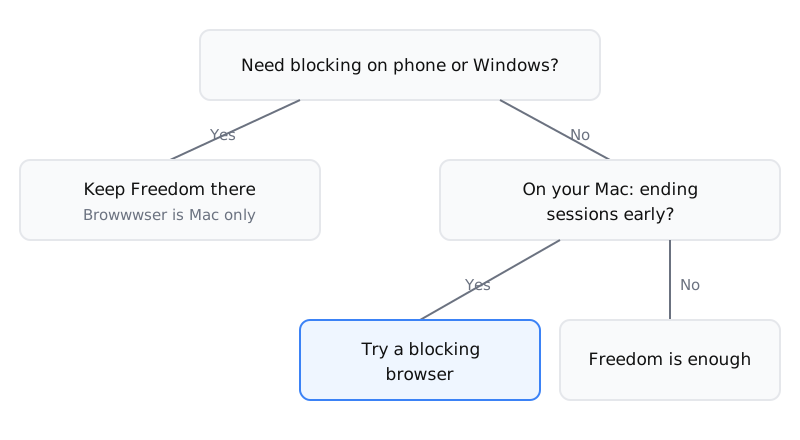
Stay with Freedom if you mostly need blocking on a phone or a Windows PC, or if Premium’s Locked Mode already holds for you. One account covering unlimited devices on every platform is what Freedom does well.
Try Browwwser on your Mac if you keep using the weekly early end, if your work VPN conflicts with Freedom’s proxy, or if you’d rather have a lock with no exit at all. You only need the trial to find out whether using it as your main browser suits you.
Use both if your Mac is where you work and your phone is where you scroll. Run Browwwser on the Mac and keep Freedom or Screen Time on the phone.
Frequently asked questions
Is Freedom free?
Freedom has a free plan with unlimited devices, sync and app blocking, but each session lasts at most 2 hours and there is no scheduling or Locked Mode. Premium was $3.33 a month billed yearly (about $39.96) when checked on 11 October 2026.
Does Freedom use a VPN on Mac?
No. On Mac and Windows, Freedom blocks through a local proxy by default, with an optional Non-Proxy Mode. The VPN-style Freedom Profile is what it uses on iPhone, together with a Safari Content Blocker and Screen Time.
Can you end a Freedom Locked Mode session early?
Yes, once per 7-day period, according to Freedom's own documentation. Locked Mode is Premium only, and you have to turn it on for each device as well as on the dashboard.
Does Freedom block Mac apps?
Yes. Freedom hides blocked Mac apps by default, and its Kill Blocked Apps setting force-quits them instead. App blocking is included in the free plan.
Does Browwwser work on iPhone or Windows?
No. Browwwser runs only on macOS 12 or later, and there is a waitlist for Windows. If your phone is where you get distracted, keep Freedom (or Screen Time) on the phone.
The Bottom Line
Freedom is a solid choice if you need cross-platform (Mac, Windows, iOS, Android). But if your main problem is bypassing your own blocker when willpower runs out, Browwwser solves that at the architecture level — the blocking runs inside the browser engine, not on top of it.
Blocking that lives in a browser extension can be switched off in two clicks. Browwwser blocks from inside the browser engine.
Try it free for 7 days