The best BlockSite alternative
Which website blocker is right for you?
Quick Comparison
| Feature |  Browwwser Browwwser |  BlockSite BlockSite |
|---|---|---|
| Platform | macOS | Chrome, Android |
| Price | $99/yr or $199 lifetime | Free, paid Premium |
| Free tier | 7-day free trial | Yes (3 blocked sites) |
| Bypass difficulty | Very hard | Low |
| Blocking method | Browser engine — requests killed at the network layer, no extension to disable | Browser extension + Android app |
If BlockSite keeps getting switched off on your Mac, you need a blocker that doesn’t live in a Chrome extension. The free options are Screen Time and SelfControl. Cold Turkey suits you if you also use Windows, and Browwwser is a browser with blocking built in. If BlockSite’s block page is enough of a nudge for you, keep it. The options below are for when it isn’t.
BlockSite is no longer just a Chrome extension
Much of what’s written about BlockSite describes it as it was a few years ago. BlockSite’s site now lists versions for Chrome, Edge, Firefox, Safari on Mac, iPhone and Android:
- Chrome: 1,000,000 users and a 4.5 rating from 32.4K reviews, version 7.1.1, updated July 26, 2026, according to the Chrome Web Store listing. The developer is BlockSite LP of Wilmington, Delaware.
- Safari on Mac: a Mac App Store app released May 15, 2025, for macOS 10.14 or later. It blocks sites in Safari only.
- iPhone: an iOS app for iOS 17.6 or later (iPhone only, no iPad version). The listing says it blocks through “inner VPN services”.
- Firefox: the add-on was last updated April 25, 2024.
Its features include category blocking (social, adult, shopping, news, sports, gambling), keyword blocking, site redirects, a custom block page, usage limits, a Focus Mode timer, Slack blocking during focus time and sync across devices. On iPhone, keyword blocking, unlimited categories and password protection need Premium.
What BlockSite costs
You won’t find one clear price. On October 8, 2026, the official pricing page showed only a “limited time” lifetime deal at $39.99 with a 30-day money-back guarantee. The iPhone app lists in-app prices from $3.99 to $14.99 a month and from $23.99 to $47.90 a year. A free tier exists, but its limits aren’t published. Cisdem’s March 2026 review counted 3 sites, keywords or categories combined.
What it collects
A blocker sees every URL you open. The Chrome Web Store disclosure says BlockSite collects web history, and that this data isn’t sold outside approved use cases. The full policy is at blocksite.co/privacy.
Is BlockSite open source?
No. The open-source project is a different extension called Block Site by ray-lothian. It’s licensed MPL-2.0, runs on Chrome, Firefox, Opera and Edge, and its maker states no link to blocksite.co. If you want code you can read, use that project. It’s still an extension, though, so it has the same weaknesses described below.
Why BlockSite is easy to get around in Chrome
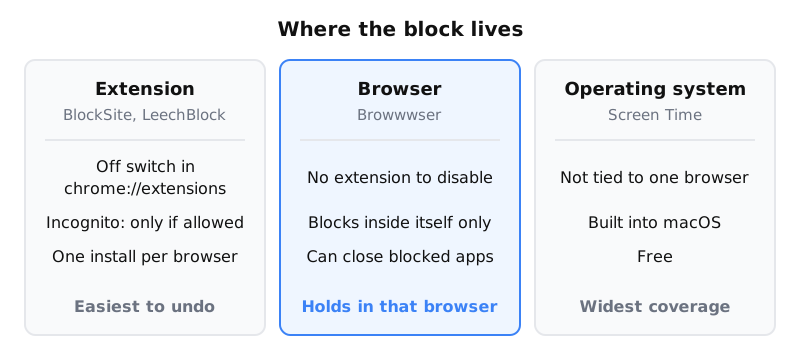
In Chrome, BlockSite is an extension, and Chrome lets you manage every extension. You don’t need any technical skill to get past it:
- Turn it off. Open
chrome://extensionsand switch BlockSite off. - Open an incognito window. Extensions only run there if you turn on “Allow in incognito” under Manage extensions › Details, as Google’s help page explains.
- Switch Chrome profile. Extensions are installed per profile, so a new profile has no blocker.
- Open another browser. BlockSite syncs your list across devices, but each browser only blocks if it has its own BlockSite install.
BlockSite now advertises Password Protection and Uninstall Prevention. It doesn’t explain how Uninstall Prevention works in desktop Chrome, and Cisdem reports that the password “can’t prevent one from uninstalling”. Either way, the toggle at chrome://extensions is still there.
None of this matters if you never try to get around your blocker. It matters a lot if you do.
Which alternative fits your situation
Go down the list and stop at the first line that describes you.
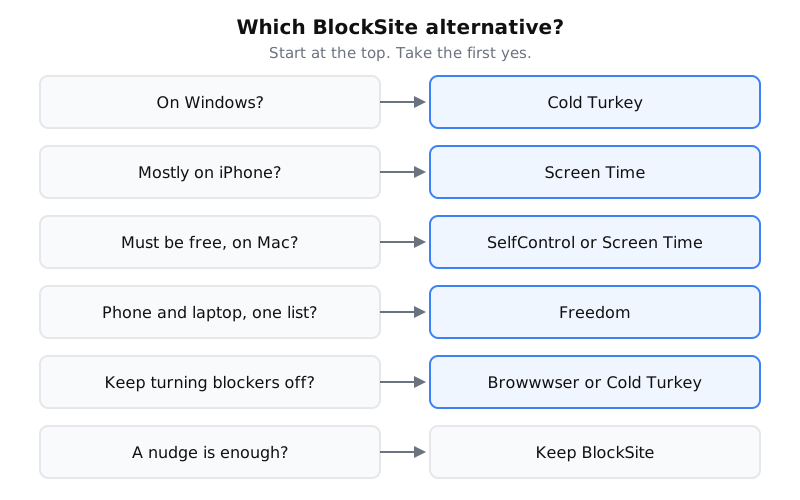
- On Windows: use Cold Turkey. Its blocking is not tied to a single browser extension. See the Cold Turkey comparison.
- Mostly on iPhone: Screen Time is built in and free. BlockSite’s own iPhone app is also an option now.
- Want it free on Mac: Screen Time (System Settings › Screen Time › Content & Privacy) works across browsers. SelfControl is a free Mac app, and once its timer starts you can’t end it early. The five Mac blocking methods compared covers both in detail.
- Need one blocklist on phone and laptop: Freedom covers several devices, including iPhone. See the Freedom comparison.
- Want a free, more configurable extension: try LeechBlock for Firefox and Chrome. It has the same off switch as BlockSite.
- On a Mac and keep switching blockers off: use a blocker that isn’t an extension, such as Browwwser, Cold Turkey or SelfControl.
Where Browwwser fits, and where it doesn’t
Browwwser is a Chromium-based browser for macOS 12 or later, and its blocking is part of the browser itself. You won’t find an extension to disable. A blocked site doesn’t load. You see a plain “site is blocked” page with a count of how many times it was blocked, and no countdown or “continue anyway” button. Other features:
- Lock mode freezes your blocklist behind a recovery password you choose. There’s no unlock button and no timer.
- Scheduled blocking covers set times, such as work hours.
- One-click presets block social media, news, video or shopping sites.
- App blocking closes the macOS apps you add, such as Discord or Steam, while blocking is on. Presets cover messaging, gaming, streaming and other browsers.
Switching over is quick. You can import your Chrome bookmarks, passwords, history and extensions in one click, and Chrome extensions keep working.
It also has limits you should know about:
- It only blocks inside Browwwser. Any other browser on your Mac still works unless you add it to the apps you block. The Other Browsers preset covers Safari, Chrome, Firefox, Arc, Edge and others.
- It’s Mac only. There’s no Windows, iPhone or Android version.
- It’s paid after the trial. It costs $99 a year or $199 once for lifetime access. That’s after a 7-day free trial, with a 14-day money-back guarantee (pricing).
If you need blocking on your phone, or you want something free, the options above will suit you better.
When BlockSite is still the right choice
BlockSite makes sense if:
- A block page is enough to stop you, and you don’t go looking for workarounds.
- You want one inexpensive tool across Chrome, Safari and your phone, and you accept that each browser needs its own install.
- You’re on Android, where Browwwser doesn’t exist.
- You want features like usage limits, keyword blocking or Slack blocking during focus time more than you want a block that’s hard to undo.
If you keep ending up at chrome://extensions, BlockSite’s design is the problem, and changing its settings won’t fix it. Move the block somewhere that has no extension toggle.
Frequently asked questions
Does BlockSite work on Mac?
Yes. It works as an extension in Chrome, Edge and Firefox, and as a Mac App Store app that blocks sites in Safari. It does not block desktop apps, and each one only blocks inside the browser where it is installed.
Can you bypass BlockSite?
In Chrome, yes. You can switch the extension off at chrome://extensions, open an incognito window (unless you turned on "Allow in incognito"), use another Chrome profile, or open another browser. Password protection adds friction, but a March 2026 review by Cisdem found it does not stop you uninstalling the extension.
What is a free BlockSite alternative for Mac?
Screen Time is built into macOS and is not tied to one browser. SelfControl is a free Mac app whose timer cannot be ended early once it starts. Both cost nothing and are harder to undo than a Chrome extension.
Can I use BlockSite inside Browwwser?
Chrome extensions work in Browwwser, so BlockSite will install. You would end up with two blocklists covering the same sites, though, and only Browwwser's built-in blocking has no extension toggle to switch off.
The Bottom Line
BlockSite is a solid choice if you need very easy to set up (Chrome extension). But if your main problem is bypassing your own blocker when willpower runs out, Browwwser solves that at the architecture level — the blocking runs inside the browser engine, not on top of it.
Blocking that lives in a browser extension can be switched off in two clicks. Browwwser blocks from inside the browser engine.
Try it free for 7 days