The best LeechBlock alternative
Which website blocker is right for you?
Quick Comparison
| Feature |  Browwwser Browwwser |  LeechBlock LeechBlock |
|---|---|---|
| Platform | macOS | Chrome, Firefox |
| Price | $99/yr or $199 lifetime | Free |
| Free tier | 7-day free trial | Fully free |
| Bypass difficulty | Very hard | Low |
| Blocking method | Browser engine — requests killed at the network layer, no extension to disable | Browser extension |
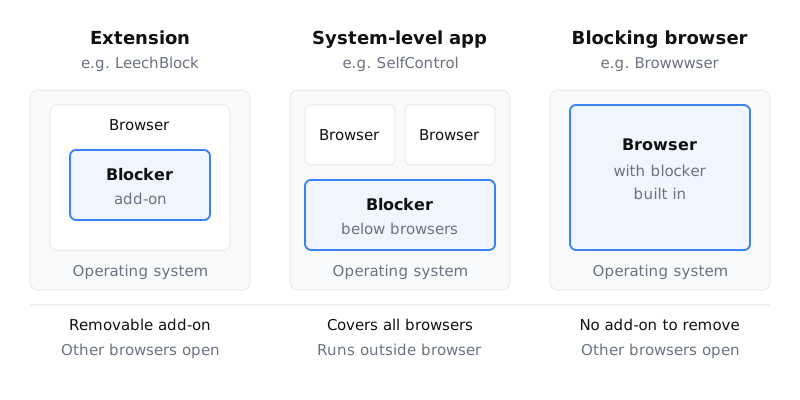
If you keep switching LeechBlock off, look for a blocker that isn’t an extension you can remove in two clicks. On a Mac, SelfControl is the free option. Cold Turkey and Freedom are run by a separate app, and Browwwser builds blocking into the browser itself. If you rarely bypass LeechBlock, or you work in Firefox or on Linux, it is still a good free tool and you can keep it.
What LeechBlock NG does well
The version you install today is LeechBlock NG. It is free and open source. It runs in Firefox, Chrome, Edge and other Chromium browsers, including Brave, Opera and Vivaldi (official page). The latest releases are v1.8 for Firefox, from 27 September 2026 (releases), and v1.7.3 for Chrome, from 5 August 2026 (releases). The Chrome build is one release behind.
Its strength is how precisely you can set rules:
- Up to 30 block sets, each with its own sites and schedule.
- Time periods and time limits, used alone or together. You can block sites from 9am to 5pm, allow “10 minutes in every hour”, or both (how the two combine).
- A countdown that delays access to a site instead of blocking it outright.
- Wildcards, exceptions and keywords, plus regular expressions since v1.7.2.
- Export and import of your settings, under Options › General.
The developer states that LeechBlock collects no data (privacy FAQ).
Lockdown and the options lock are separate features
People often mix these two up. Lockdown blocks a block set’s sites right away, for a length of time you pick. Stopping yourself from editing the rules is a different setting: “Prevent access to options for this block set at times when these sites are blocked” (FAQ). If you want rules you can’t loosen mid-session, turn on the second one.
You can also require a password or a random access code to open the options. In Firefox, v1.8 can stop you pasting that password from the clipboard. If you forget it, the documented fix is to email the developer (reset FAQ). That slows you down, but it isn’t a hard lock.
The four ways around LeechBlock
The developer says plainly that LeechBlock is “not designed for parental controls” and “may allow brief server connections” (official page). The options lock protects its settings, but it leaves four ways around the block open:
- The extensions page. Open
chrome://extensionsorabout:addonsand turn it off or remove it. The developer notes that without enterprise policy, a Chrome extension cannot stop you uninstalling it (FAQ). - A private window. Chrome only runs an extension in Incognito if you turned on “Allow in Incognito” (Google). Firefox has kept extensions out of private windows by default since version 67 (Mozilla). As the developer puts it, “LeechBlock cannot disable private browsing” (FAQ).
- Another browser. Safari, or any second browser without the extension, is one click away.
- The system clock. Schedules follow your computer’s clock, so changing the clock moves the block. The developer’s fixes cover Windows only (FAQ).
Can you make LeechBlock harder to remove?
Partly. The developer documents how to force-install it through browser policy: ExtensionInstallForcelist in Chrome, or Extensions › Locked in Firefox (Chrome FAQ, Firefox FAQ). Once a policy installs the extension, you can’t remove it from the extensions page.
The developer gives no Mac steps. Instead he points to Google’s Chrome policy documentation for Mac and Mozilla’s policy templates. A policy also does nothing about other browsers or the clock. And since you set the policy yourself, you can remove it too. If you are editing policy files to stop yourself, a tool designed to be hard to switch off is less work.
Which LeechBlock alternative fits
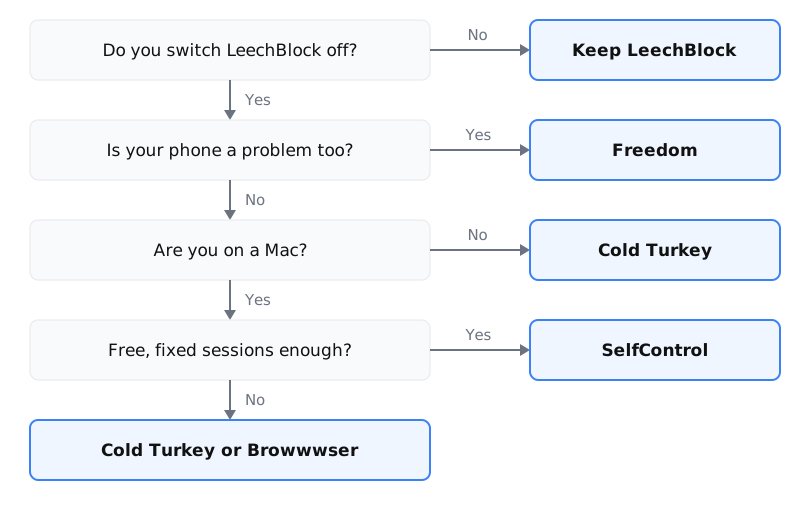
Choose based on how you usually get around the block, not on which tool has the most features.
Free, on a Mac: SelfControl
SelfControl is free, open source and macOS only (v4.0.2, for macOS 10.10 or later). Once a block starts it can’t be stopped early, even if you restart or delete the app, and it covers every browser. For more, see our SelfControl alternative page.
Apps as well as sites, on Windows or Mac: Cold Turkey
Cold Turkey is a desktop app for Windows and macOS. The free version blocks websites. App blocking, scheduling and password protection are in Pro, a one-time purchase that covers all your computers and comes with a 30-day refund (pricing). See how Cold Turkey compares on Mac.
Your phone is part of the problem: Freedom
LeechBlock has no iOS version, and it only reaches Android through Firefox for Android. Freedom runs on macOS, Windows, iOS, Android and Chromebook and syncs between them. There is a free plan. Premium, which includes Locked Mode, costs $8.99 a month or $3.33 a month billed yearly (pricing, checked 1 October 2026). More in our Freedom alternative page.
On a Mac, and the extension is the weak spot: Browwwser
Browwwser is a Chromium-based browser for macOS 12 or later with blocking built in, so there is no extension to switch off. A blocked site doesn’t load: Browwwser shows a plain “site is blocked” page, with no “continue anyway” button. Lock mode freezes the blocklist behind a recovery password you choose, with no unlock button and no timer. Browwwser also closes the macOS apps you add to the list, such as Discord, while blocking is active.
Its limit is the same as the third way around LeechBlock: website blocking only applies inside Browwwser, so it only helps if you make it your browser. Its Other Browsers preset can close Safari, Chrome and Firefox while blocking is on. After a 7-day trial it costs $99 a year or $199 once (pricing).
When to keep LeechBlock
Keep it if you mostly follow your own rules and just want a nudge. Also keep it if:
- You use Firefox or Linux, where Mac-only tools don’t help.
- You use Brave. It is listed as supported; install LeechBlock NG from the Chrome Web Store.
- You want blocking on Android through Firefox for Android.
- You rely on per-hour time limits or countdown delays.
A common setup is one block set for Reddit on weekdays from 9 to 5. Our guide on blocking Reddit during work hours covers that setup step by step. For other questions, the developer answers on a Q&A forum on GitHub Discussions.
Moving from LeechBlock to Browwwser
Browwwser imports your Chrome bookmarks, passwords, history and extensions in one click, and Chrome extensions work in it. So you can keep LeechBlock NG for its time limits, using Options › General to export and import your block sets. Browwwser’s own blocking then handles the sites that must stay shut.
Next, add your sites to the blocklist or start from a preset (social media, news, video or shopping). Set a schedule for work hours, and turn on lock mode when you need it. Any other browser on your Mac is still a way out, unless you close it with the Other Browsers preset. Our guide to blocking websites on Mac compares system-level methods you can pair with Browwwser. If it doesn’t suit you, there is a 14-day money-back guarantee.
Frequently asked questions
Does LeechBlock work in Brave?
Yes. The developer lists Brave as a supported Chromium browser, along with Opera and Vivaldi. Install LeechBlock NG from the Chrome Web Store inside Brave.
Is LeechBlock free?
Yes. LeechBlock NG is free and open source under the Mozilla Public License 2.0. It has no paid tier, no subscription and no account.
Can LeechBlock be bypassed?
Yes, in four ways: disable or remove it from the extensions page, open a private window where it isn't allowed to run, use another browser, or change the system clock. The password and options lock protect its settings, but they don't close these routes.
Is there a LeechBlock app for iPhone or Mac?
No. LeechBlock NG is a browser extension. It works in desktop browsers, including on a Mac, and on Android through Firefox for Android, but there is no iOS version and no standalone macOS app.
What is the difference between LeechBlock's lockdown and the options lock?
Lockdown blocks a block set's sites right away for a length of time you choose. The options lock is a separate setting that stops you editing a block set while its sites are blocked, so you can't loosen the rules in the middle of a session.
What is the best free LeechBlock alternative on a Mac?
SelfControl is free, open source and macOS only. Once a block starts it can't be stopped early, even by restarting or deleting the app, and it applies to every browser. It has none of LeechBlock's detailed scheduling.
The Bottom Line
LeechBlock is a solid choice if you need completely free. But if your main problem is bypassing your own blocker when willpower runs out, Browwwser solves that at the architecture level — the blocking runs inside the browser engine, not on top of it.
Blocking that lives in a browser extension can be switched off in two clicks. Browwwser blocks from inside the browser engine.
Try it free for 7 days